TL;DR
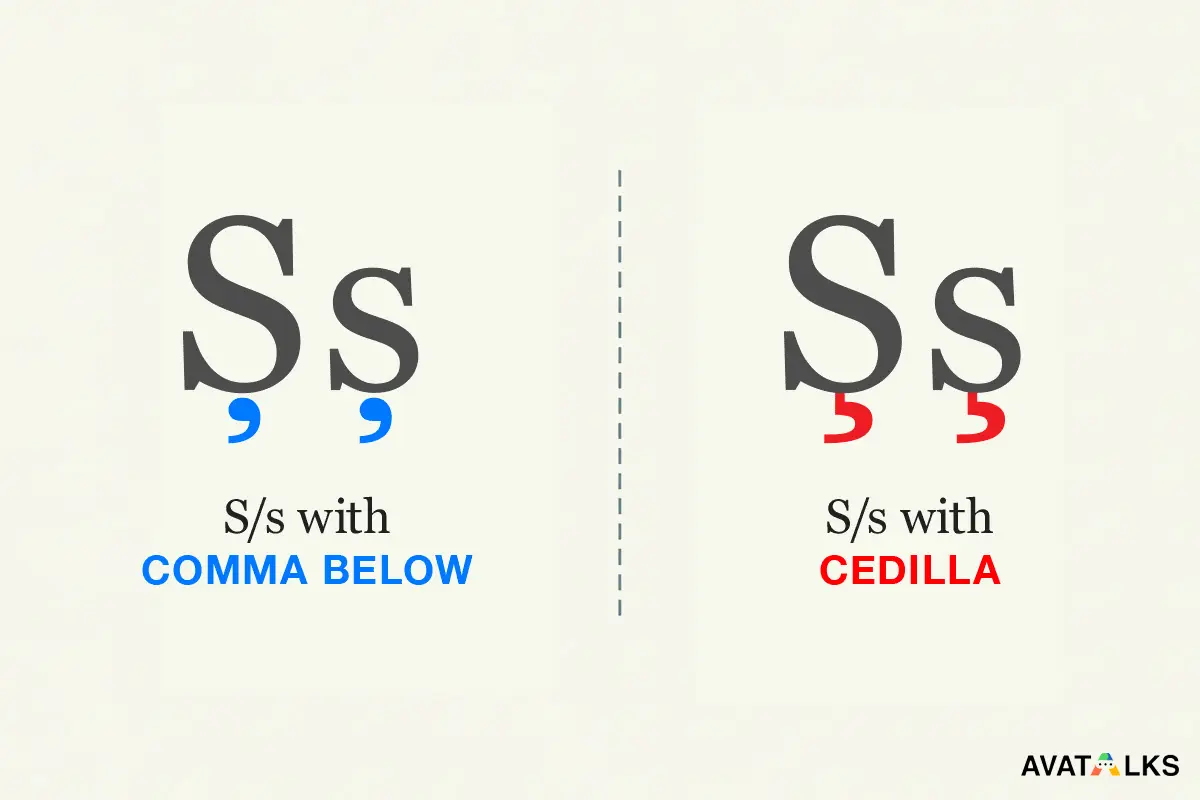
- Correct Romanian letters are Ș and Ț (comma below).
- Ş and Ţ (cedilla) look similar but are not correct for Romanian.
- The problem comes from old fonts, keyboards, or copy-paste.
- Fixing it is easy once you know what to replace.
Romanian alphabet pronunciation hub
If you want the full system behind these sounds, see the Romanian alphabet pronunciation hub
Explore the practice hub →The problem you’re seeing (in plain words)
You write Romanian, but sometimes:
- Ș turns into Ş
- Ț turns into Ţ
- Text looks fine in one place, but changes after copy-paste
- Search or spell-check behaves strangely
This is not your fault.
It’s a Unicode and font issue, not a language mistake.
What is actually correct in Romanian?
Romanian officially uses comma-below letters, not cedilla.
✅ Correct Romanian letters
- Ș (capital) / ș (lowercase)
- Ț (capital) / ț (lowercase)
These are the standard letters taught in schools and used in modern Romanian.
❌ Incorrect for Romanian (but often seen)
- Ş / ş (S with cedilla)
- Ţ / ţ (T with cedilla)
They exist in Unicode, but they belong to other languages, not Romanian.
Why do Ş and Ţ still appear everywhere?
Because history + technology.
Common causes:
- Old Windows keyboard layouts
- Legacy fonts from the 1990s–2000s
- PDFs or Word files created long ago
- Websites that never updated their encoding
- Copy-pasting from Wikipedia mirrors or scans
Visually, cedilla and comma-below look similar in many fonts, so the mistake survived for years.
Does this affect pronunciation?
No. Never.
- Ș = /ʃ/ (like “sh” in ship)
- Ț = /ts/ (like cats)
Whether it’s typed as Ș or Ş, people pronounce it the same.
The issue is writing and encoding, not sound.
Why should you care at all?
Because computers care.
Using the wrong character can cause:
- Search mismatches (Ș ≠ Ş)
- SEO and indexing inconsistencies
- Database duplicates
- Broken text normalization
- Problems when exporting or translating content
For learners, it also causes confusion when copying words from different sources.
How to quickly check what you have
If you’re unsure which version you’re using:
- Copy the letter into a code editor or inspector
- Or compare visually:
| Letter | Looks like | Correct for Romanian |
|---|---|---|
| Ș | S with comma | ✅ Yes |
| Ş | S with tail | ❌ No |
| Ț | T with comma | ✅ Yes |
| Ţ | T with tail | ❌ No |
The simplest fix (copy-paste safe)
Just replace these characters everywhere:
Ş→Șş→șŢ→Țţ→ț
That’s it.
No pronunciation change. No grammar change.
Fonts: why text sometimes looks wrong
Some fonts do not clearly distinguish between comma below and cedilla, which is why the problem keeps appearing.
Common font-related causes include:
- Fonts that don’t visually show the comma clearly
- Fonts that render cedilla and comma almost identically
- Automatic character substitution in older font families
If Romanian text looks suspicious or inconsistent, try the following:
- Use modern fonts such as Inter, Roboto, Noto, or Arial
- Avoid very old serif fonts, especially those created before full Unicode support
Best practices going forward
To avoid this issue permanently, follow these simple rules:
- Always type Ș / Ț, not Ş / Ţ
- Use modern keyboard layouts or system input methods
- Normalize text before publishing or storing it in databases
- Fix legacy content once, instead of correcting it repeatedly
If you’re learning Romanian, it’s best to learn the correct forms early so you don’t have to unlearn bad habits later.
Final takeaway
This issue is not about Romanian being difficult.
It exists because of:
- Old technology
- Similar-looking characters
- A historical Unicode and font transition
Modern Romanian officially uses Ș and Ț (comma below).
Once you switch to the correct characters, the problem disappears completely.
Next step
Return to the Romanian alphabet pronunciation guide to practice all special letters with audio and real examples.